
The report button
Once a token is set, a floating button appears on every page, bottom-right by default. There is nothing to add to your Blade layouts; a global middleware injects it into every HTML response.
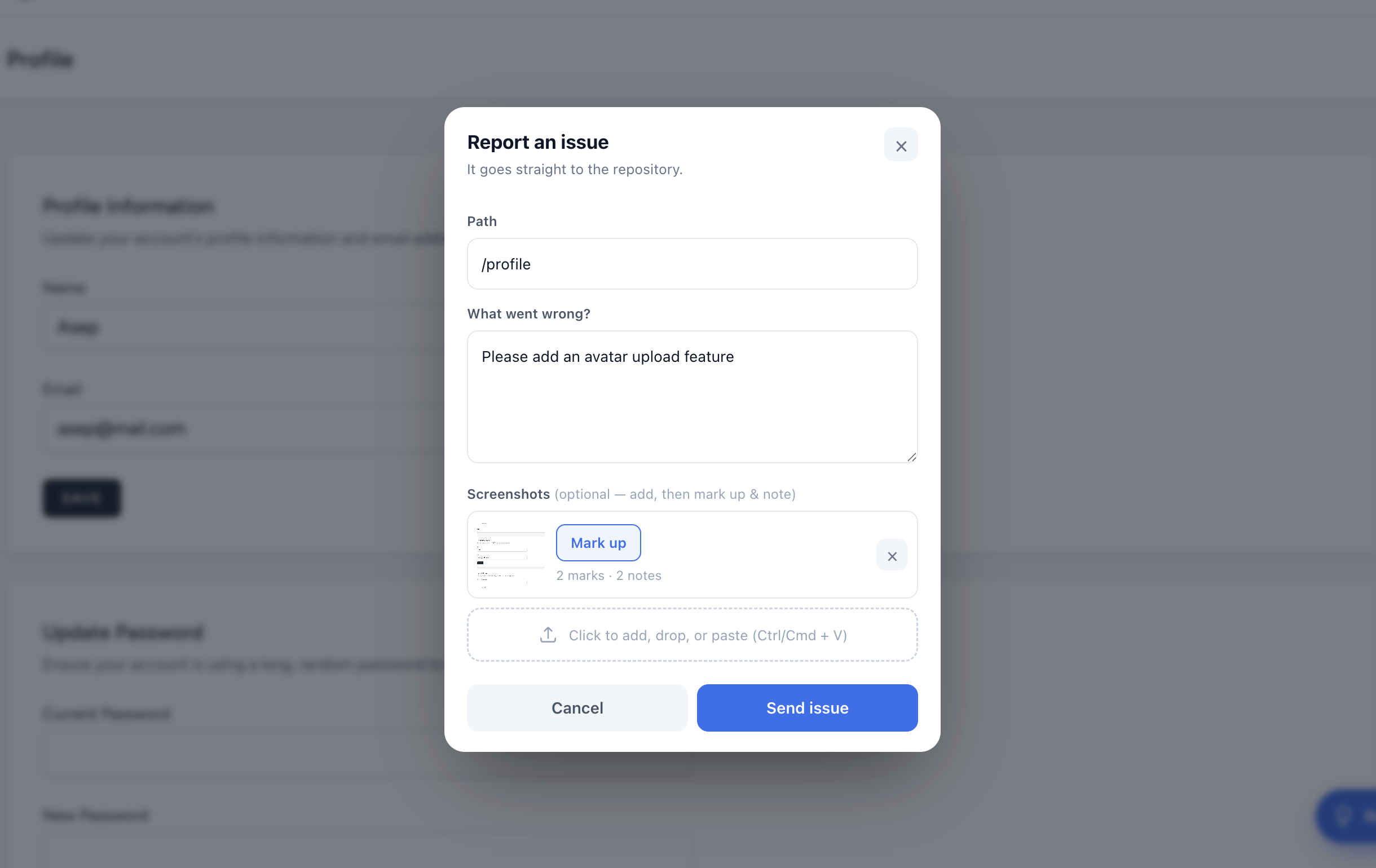
What the client fills in
- Path — pre-filled with the current page path (editable), so you always know where the report came from.
- What went wrong — a plain description. This becomes the issue title and body.
- Screenshots — optional. Add one or several by clicking, dragging, or pasting (Ctrl/Cmd + V). Each one can be marked up.
When they press Send issue, the form posts to a package route on your own server, which creates the issue through the configured provider and returns a short thank-you. Clients never see the repository.
Where it shows, and who can use it
The button is tied to the token, which lives in .env and differs per environment. Set it in local and staging, leave it out of production, and the button is there exactly where you want it. The submit endpoint is rate limited and rejects requests when no token is configured.
On mobile
The button collapses to a compact icon, and the mark-up editor stacks into a single column. Everything works with touch.